Legal & Security
Questionnaires answered in minutes.
Automate privacy & security questionnaires and stop the endless copy-pasting. Empower your team to answer complex security and compliance questionnaires in minutes, not weeks, and unblock the business.
Automate privacy reviews in minutes, not weeks.
Transform your time-consuming privacy and security questionnaire process into a simple, automated workflow in 3 steps.
Step 01
Upload your knowledge.
Upload historical privacy assessments, security documentation, and past questionnaires to create a centralized knowledge base.
Step 02
Submit a new questionnaire.
Drop in any new privacy or security questionnaire — Excel, Word, or PDF. Wordsmith reads it in the original format.
Step 03
Get instant, accurate answers.
Wordsmith fills out the questionnaire with approved, consistent answers, directly in the original format. Ready to review and send.
Core capabilities
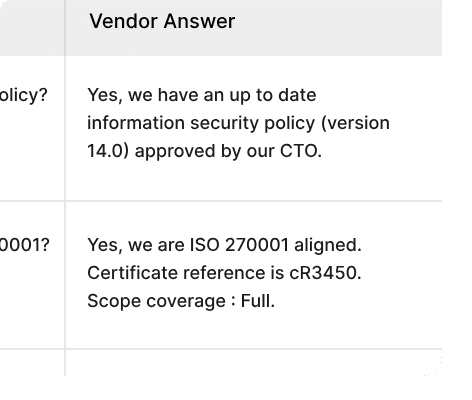
Answers directly in their spreadsheet.
No more copy-pasting. Wordsmith fills out answers directly in Excel, maintaining all original formatting, comments, and data validations.
Native Excel output. Answers land in the exact cells, preserving all formatting and validation rules the vendor set.
Zero reformatting. The filled questionnaire is ready to send — no manual cleanup or copy-paste from a separate document.
All formats supported. Excel, Word, PDF, and web-based questionnaire portals all handled the same way.
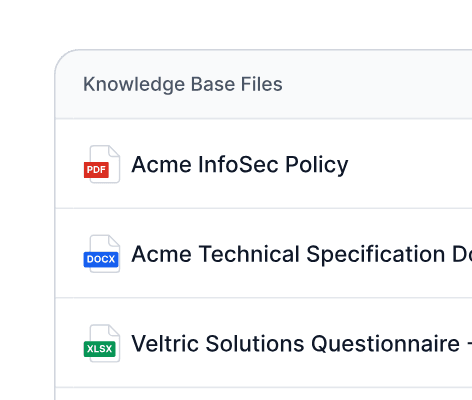
Trained on your privacy positions.
Wordsmith builds a secure knowledge base from your past privacy reviews, DPAs, and security policies. It learns your specific legal language and compliance positions to provide answers you can trust.
Learns from your history. Past questionnaire responses, DPAs, and policy documents become a searchable knowledge base.
Consistent legal language. Every answer reflects your approved positions, not a generic AI response.
Continuously improving. Each review cycle enriches the knowledge base, making future responses more accurate.
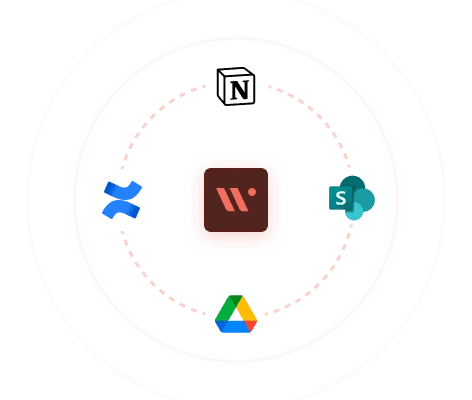
Connects to your internal data.
Go beyond uploaded files. Securely connect to Confluence, SharePoint, Notion, and Google Drive to ensure your privacy responses are always aligned with your latest internal policies and documentation.
Live policy sync. Pull directly from Confluence, SharePoint, Notion, or Google Drive — no manual re-uploading when policies change.
Always current. Responses reflect the latest version of your documentation, not a static upload from six months ago.
Secure connections. Read-only integrations via standard OAuth — no credentials stored, no write access required.
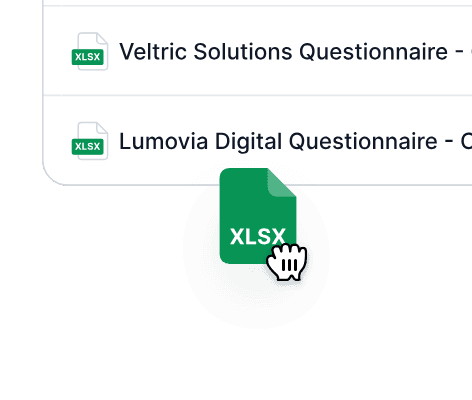
So simple, anyone can use it.
Empower other teams to handle initial privacy questionnaire drafts. A simple drag-and-drop interface means no complex implementation, freeing up the legal team from the initial grunt work.
Drag-and-drop submission. Sales and security can drop in a questionnaire and get a draft back without involving legal at all.
No training required. The interface is intuitive enough that any team member can submit and retrieve a questionnaire response.
Legal reviews the output. Not the intake. Legal time is spent on edge cases and approvals, not first-pass drafting.
Fine-tune and update responses.
Legal has full control. Easily review, edit, and approve all AI-generated answers. Your feedback continuously improves the knowledge base, ensuring future privacy responses are perfectly aligned with your legal stance.
Edit before sending. Every answer is reviewable and editable before anything leaves your team.
Approve or reject with one click. Simple accept/reject workflow keeps the review cycle fast without losing oversight.
Feedback loops in. Corrections feed directly back into the knowledge base, so the same mistake never happens twice.
A win for the whole business.
For legal teams
Stop repeating answers on DPAs and privacy clauses.
Maintain consistent messaging on all privacy reviews.
Free up time for strategic legal work.
Reduce risk of inconsistent or outdated responses.
For security teams
Standardise security posture communication.
Ensure accurate technical responses every time.
Eliminate manual searching through documentation.
Focus on security improvements, not questionnaires.
For sales teams
Get RFP responses in hours, not days.
Self-serve standard vendor questionnaires.
Close deals faster with shorter sales cycles.
Reduce dependency on legal & security.
Works where you do.
Integrates with email, Slack, and the tools your team are using day-to-day. No need to change how you work.





Frequently asked questions.
What types of questionnaires can Wordsmith handle?
Wordsmith handles the full range of security and privacy questionnaires: vendor DDQs, RFP security sections, ISO 27001 assessments, SOC 2 questionnaires, GDPR DPIAs, and custom security intake forms. If a prospect or customer sends it, Wordsmith can fill it.
What file formats does Wordsmith support?
Excel (.xlsx), Word (.docx), and PDF questionnaires are all supported. Wordsmith outputs answers in the original file format, preserving all formatting, merged cells, and data validation rules set by the sender.
Does Wordsmith maintain accuracy and consistency in responses?
Yes. Every answer is drawn from your approved knowledge base — past questionnaire responses, DPAs, and security policies that you have uploaded or connected via integrations. Wordsmith does not generate new positions; it applies existing approved ones consistently.
How does Wordsmith learn from my documentation?
You upload historical privacy assessments, security documentation, and past questionnaires to create a knowledge base. Wordsmith indexes these and uses them as the source for all future answers. As you review and correct AI-generated responses, those corrections feed back into the knowledge base automatically.
How much time can automation save my team?
Teams typically reduce time spent on security questionnaires by 80–90%. A questionnaire that previously took a week of back-and-forth between legal, security, and sales can be drafted in minutes and reviewed in under an hour.
Is my sensitive data secure with automated questionnaire processing?
Yes. Wordsmith uses read-only OAuth integrations to connect to your document sources — no credentials are stored, no write access is granted. All data is encrypted in transit and at rest. The knowledge base is private to your organisation and is never used to train shared models.
